Don’t just explore your character’s world, enter it. When you sync your Philips Hue lights to your media, you transform your gaming into fully immersive experiences like never before. How you do it depends on whether you’re a console gamer or a PC gamer.

Sync your lights for the ultimate gaming experience
Superior light syncing for your gaming
Enter your character’s world and transform your gaming into fully immersive experiences like never before.

1-to-1 color matching
Instant analysis of the entire screen generates ultra-accurate color for every moment.

Lightning-fast response
The Bridge doesn’t use Wi-Fi to communicate with your lights, so there’s no lag.

Sync up to 10 lights
Position them in a virtual room in the Hue app to correspond to their real-life location.

Customize the experience
Adjust the intensity and brightness of your lights.
Start syncing your gaming lights

For PC gamers: Hue Sync desktop app
The Hue Sync app brings surround lighting to your gaming setup. It’s free to download for both Mac OS and Windows.

macOS Monterey and up

Windows 10 and up
Hue Sync is only available to download on desktop
Which gaming sync solution is best for you?
* MacOS Big Sur and up, Windows 10 and up
Surround lighting essentials for more gaming
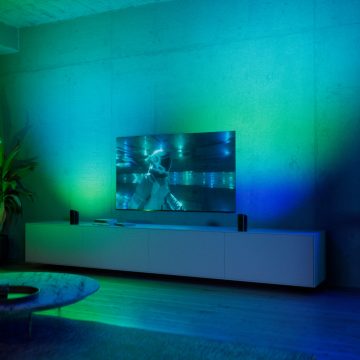
Hue color ambient lights
Create an immersive surround lighting experience that syncs with the colors on your screen. Link up to 10 Hue lights with a full range of vibrant colors.

Hue lightstrips
Elevate your gaming sessions by lighting up the edges of the back of your TV or PC monitor with Hue lightstrips.

Hue Bridge
To sync your Hue lights with your gaming, a Hue Bridge is required. It unlocks the full potential of your Philips Hue system with automations, smart control, and much more.
What you need to improve your gaming experience

Signe lamp
Tall and slender, these floor and table lamps wash the wall with colorful light. Place it next to your gaming setup for the best effects!

Play light bars
Lay them down or stand them up. No matter how you position them, Play light bars are the perfect addition to your entertainment area.

Play wall washer
Featuring a wide illumination area and surprisingly compact design, the Play wall washer is the ultimate TV enhancement. ColorCast™ technology and a sleek aluminum design make it the perfect colorful accent for your home theater (or anywhere else).
How to sync lights with your gaming
Gaming lights work with:


*Sign up and save 15%. You should receive your code within 1 hour after your subscription, but processing time may vary. This promotion is not valid on email addresses that are already enrolled in the Philips Hue newsletter. Read the Terms & Conditions for this promotion.
*When a bulb displays "Up to" a certain number of lumens in its specifications, it displays the maximum lumen output of the bulb. It shows how bright the bulb can get at 2700 K (White bulbs) or 4000 K (White ambiance or White and color ambiance bulbs). Learn more about brightness.